Wheelz - Social Drive Tracker
- 4.8
- Rating
- 10.00K
- Installs
- Free
- Price

 Analysis by App-foxy
I spend a lot of time testing navigation and driving tools, and Wheelz - Social Drive Tracker immediately struck me as a different kind of Maps & Navigation app. It is not trying to replace a full navigation service with a giant map database. Its focus is the drive itself: keeping a record of trips, showing driving speed, tracking mileage, and making it possible to share the experience with friends. That narrower purpose can be genuinely useful, provided you understand where it fits.
In my experience, the best way to think about it is as a companion for people who want more awareness of their journeys rather than another turn-by-turn navigator. I would use it before a road trip, during repeated work travel, or when I wanted to compare how much driving I had actually done over a week. The social angle also gives it a more personal feel than a standard odometer-style utility. At the same time, I would not install it expecting the complete route planning, traffic intelligence, and place search of a traditional navigation platform.
What Wheelz is really designed to do
The app comes from Vortac Labs Inc and is available as a free app for everyone. Its current version is 4.2, and it supports devices running Android 8.0 or later. That compatibility makes it approachable for people using older phones, although the practical experience will still depend on the phone's location hardware, battery condition, and how comfortably the device can remain active in a car.
You May Also Like

 Pandora - Music & Podcasts
Pandora’s Music Is Easy to Start, but Harder to Recover
Pandora’s strength is its low-effort path from a seed to a station. Its weak spot is how much confidence it asks you to place in connection, setup, and quiet recovery.

 8 Ball Pool
 Is Built on Rivalries, Rematches, and Routine
A close look at the rivalries, rematches, shared routines, and unanswered safety questions that turn a quick pool match into a persistent mobile community.

 Samsung Music
’s Quiet Strength Is Playing What You Already Own
Its reach comes less from spectacle than from dependable access to a personal library. That simplicity is both the app’s strongest retention engine and its ceiling.

 AccuWeather: Weather Radar
AccuWeather Review: A Quick, Clear Forecast for Everyday Decisions
For everyday plans, the best forecast is the one you can understand quickly. AccuWeather makes rain timing, radar, and local conditions easy to act on, with a few trade-offs.

 Hill Climb Racing
Why Hill Climb Racing Still Turns Crashes Into One More Run
A tiny car, a bumpy hill and one more upgrade: Hill Climb Racing keeps resurfacing because its simple chaos makes every near-miss feel personal.

 AliExpress - Shopping App
AliExpress Makes Global Shopping Feel Personal, but Shoppers Bear the Risk
AliExpress turns a global marketplace into a pocket-sized discovery engine. Its reach is useful, its shopping loop compelling, and its trade-offs easy to miss.
More From Our News Desk
View All News


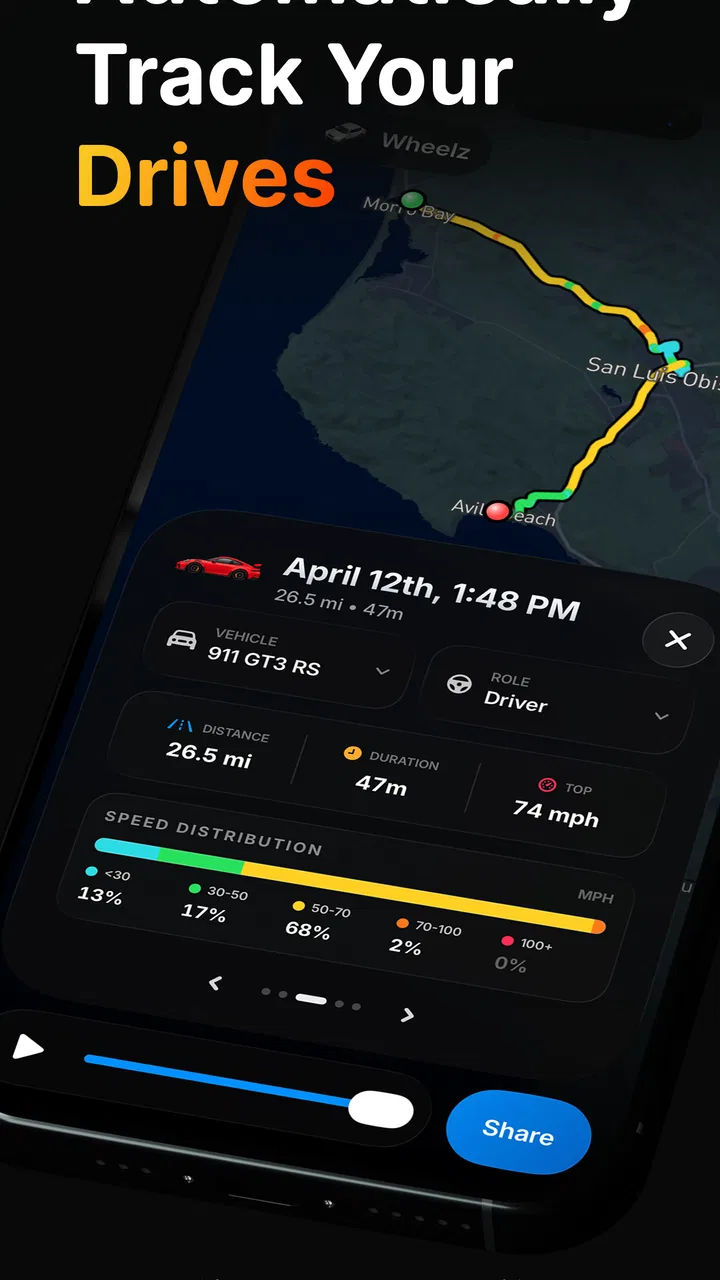
Wheelz brings together four ideas that are often separated across different tools: drive tracking, friend sharing, a speedometer, and mileage recording. That combination is the reason I see value here. A basic speedometer app may show speed but offer little context afterward. A mileage notebook may preserve distance but feel tedious. A social driving tool can make trips easier to discuss, especially when the journey itself matters as much as the destination.
The app has attracted a 4.8 average from around 742 ratings, with more than 10K installs. Those figures suggest a positive early reception, but I would still interpret them carefully. A smaller user base can mean that the experience feels focused and uncluttered, while also meaning there is less long-term public feedback to draw on than with established navigation names. The rating is encouraging, not a substitute for checking whether its driving-centered workflow matches your habits.
One practical distinction matters from the start: Wheelz is better suited to recording and understanding drives than to guiding you through unfamiliar streets. If I were crossing a city for the first time, I would rely on a conventional navigation app for route instructions and use Wheelz only if I specifically wanted a separate driving record. For regular commutes, leisure drives, or mileage awareness, its more focused approach makes more sense.
A realistic everyday routine
Imagine someone who drives to several client visits each week and wants a clearer picture of the time spent behind the wheel. Instead of trying to reconstruct the week from memory, that person could use Wheelz to track each drive, check the speedometer during the journey, and review mileage afterward. Sharing a selected drive with a friend could also be useful for a group outing, where everyone wants a common record without manually comparing notes.
There is a small but important behavioral benefit here. When a tool records the journey as it happens, it can expose patterns that a fuel receipt or calendar entry will not. A short-looking errand may involve several separate trips. A weekend drive may cover far more distance than expected. I would use those observations to plan breaks, estimate future travel effort, or decide whether keeping a particular driving routine is worthwhile.
Trust starts with visible choices
For a driving tracker, trust is not only about whether the screen looks polished. The app deals with a type of activity that can reveal routines, destinations, and social connections when a user chooses to share a drive. That makes the moments around starting a trip, stopping a trip, and sharing a record especially important.
My advice is to treat every visible control as part of the review process. Before beginning a drive, I would check what is being recorded and whether the session is active. After finishing, I would look at what information is shown in the saved record before sending anything to another person. This habit is more useful than assuming that a social feature is automatically private or automatically public.
I also prefer to separate the app's practical value from assumptions about its data practices. The available product details identify the developer, platform requirements, pricing, and core purpose, but they do not provide a reason to make broad claims about permissions, retention, encryption, or account deletion. I would therefore judge Wheelz through the controls I can actually see on the device and in the app, rather than treating silence as proof of either strong privacy or poor privacy.
That cautious approach is particularly important with location-related software. A user may be comfortable recording a scenic road trip but less comfortable preserving a daily commute. Those are different situations even though the app handles both as drives. I would make a deliberate choice each time instead of leaving tracking running simply because it is convenient.
How I would handle a drive from start to finish
My preferred workflow would be simple. I would open Wheelz before moving, confirm that the intended tracking session is ready, and position the phone where I could avoid interacting with it while driving. During the trip, I would treat the speedometer as a glanceable reference rather than something to stare at. Once parked, I would stop the session and review the mileage before deciding whether the record should remain private or be shared.
This sequence solves two common problems. First, it reduces the chance of forgetting when a recording began or ended. Second, it creates a natural privacy checkpoint after the drive, when I can think about the audience rather than making a rushed decision at the roadside. That second pause is one of the most useful habits for a social driving app.
I would also avoid using the phone to browse social content while the car is moving. A drive tracker should support safer attention, not compete with it. If I needed to change a setting, stop a session, or share a record, I would wait until the vehicle was safely parked. This is not a criticism unique to Wheelz; it is a sensible boundary for any app used in a moving car.
Where the social side helps, and where it may not
Sharing makes sense when the drive is part of a group activity. Friends on a scenic outing could compare their journeys afterward, or someone could share a completed route as a personal record of the day. The feature gives mileage and driving details a conversational purpose instead of leaving them as isolated numbers on one phone.
However, I would be selective about sharing. A drive record can reveal more than a person intends if it includes a familiar starting point, a regular destination, or timing that exposes a routine. The safest workflow is to share only after reviewing the record and considering who will receive it. If I did not know exactly what the recipient could see, I would keep the drive private until that was clear.
This is also where Wheelz may be less appealing to someone who wants a purely personal tool. If social functions feel unnecessary, a simple mileage log or built-in vehicle display may be less distracting. Wheelz earns its place when the combination of tracking and sharing adds something meaningful, not merely because it offers more buttons than an odometer.
The speedometer and mileage tools in context
A phone-based speedometer can be handy as a supplementary display, especially when a vehicle's dashboard is difficult to read or when a driver wants a separate reference during a controlled, stationary setup. I would not treat it as a replacement for the car's certified instruments. Phone readings can be affected by positioning, signal conditions, and the device itself, so the dashboard remains the sensible primary reference for ordinary driving decisions.
Mileage tracking is more useful over time. A single trip record may be interesting, but repeated use can help reveal how much driving a routine really involves. I would use the feature to compare planned and actual travel, prepare a personal log, or understand whether several small errands are adding up to a substantial amount of road time. The key is consistency: starting and ending sessions in a similar way makes the records easier to interpret.
There is a trade-off between automatic convenience and active control. A system that requires a clear start and stop may demand more attention from the user, but it can also make the boundaries of each recorded trip easier to understand. If Wheelz gives me an obvious session state, I would consider that a strength. If I had to guess whether a drive was still being recorded, I would be more cautious about relying on its history.
Battery, attention, and the small frictions that matter
Any app that uses a phone during a drive deserves a realistic battery plan. Long journeys, bright screens, location activity, and cellular use can all make a phone work harder than it does while sitting idle. I would begin a long trip with a charged device and use a proper car charger rather than expecting Wheelz to be invisible to battery life.
Phone placement matters too. A stable mount is better than leaving the device loose in a cup holder, both for visibility and for avoiding unnecessary handling. I would configure the setup before leaving, then keep my interaction to a minimum. This is a practical limitation of the whole category: the phone is doing useful work, but it can become a distraction if the workflow is not prepared in advance.
Older supported devices may also vary in how smoothly they handle active location tasks. The minimum operating system is Android 8.0, but that does not guarantee identical performance across every phone. If a device is already struggling with battery health or background activity, I would test Wheelz on a short local drive before trusting it for a full-day trip.
What the free model means for a careful user
Wheelz is free to download and use, while in-app purchases range from $2.99 to $39.99 per item. That gives people a low-risk way to try the basic experience before deciding whether any paid option is worthwhile. I would start by using the free portion for several ordinary drives, not just one exciting road trip. The important question is whether tracking, reviewing, and sharing fit naturally into daily use.
Before buying anything, I would identify the exact problem the purchase is meant to solve. If I only need occasional mileage records, paying may not add enough value. If a paid option removes a recurring limitation or improves a workflow I use every week, it may be easier to justify. The wide range between the smallest and largest listed purchase also makes it especially important to read each purchase screen carefully rather than assuming every option offers the same kind of benefit.
I would also remember that free does not mean frictionless. A free app can still ask for attention, battery, storage, and access to information needed for its functions. My own test would include not only whether the tracker works, but whether I understand when it is active, what I can share, and how easily I can stop using it.
Who should choose Wheelz over a usual navigation app?
I would recommend it to drivers who want a dedicated record of their journeys, a separate speed display, or a social way to discuss road trips. It is particularly interesting for people who enjoy reviewing travel patterns rather than simply arriving at a destination. The app's focused design can feel more appropriate than opening a complete navigation suite for a task that is really about the drive.
I would be more hesitant for drivers whose main need is route guidance. If you need dependable turn-by-turn directions, live traffic decisions, extensive place search, or a mature ecosystem for navigating unfamiliar areas, a conventional navigation service is the better primary tool. Wheelz should complement that setup rather than be forced to replace it.
It is also not the right choice for someone who dislikes location tracking in principle. Even if the controls are clear, the whole point of the app is to record driving activity. A manual notebook, vehicle trip computer, or a privacy-focused offline method may be more comfortable for a person who wants to avoid creating digital journey records.
Questions I would settle before relying on it
The first question is whether it works with an older phone. The answer is yes in terms of operating-system support, since Android 8.0 is the minimum, but I would still run a short test because hardware and battery condition can change the experience. A supported operating system is a starting point, not a promise that every device will behave identically.
The second question is whether it costs anything to begin. It is free, so trying the basic workflow does not require an upfront purchase. I would use that opportunity to test a commute, a longer drive, and a completed-trip review before considering any in-app purchase.
The third question is whether it can replace a navigation app. I would say no, not as my main navigation tool. Its identity is built around tracking drives, mileage, speed, and sharing, while a traditional navigation app is built around finding and following routes. They solve related but different problems.
The fourth question is whether every drive should be shared. I would not do that automatically. I would inspect the record, think about what it reveals, and share only when the social benefit outweighs the privacy cost. Keeping a drive private is a valid use of a tracking app, especially for routine journeys.
Finally, I would ask whether the app is worth keeping after the novelty fades. My test would be simple: does it help me make better travel decisions, maintain a useful mileage history, or enjoy group drives more? If the answer remains yes after several ordinary trips, Wheelz has earned a place on the phone. If I only open it to look at a speed display once in a while, a simpler alternative may be enough.
My cautious verdict
Wheelz - Social Drive Tracker is a focused Maps & Navigation app with a clear appeal: it turns everyday driving into something that can be recorded, reviewed, and shared. I like that it brings mileage and speed into the same driving-centered experience instead of treating them as unrelated utilities. Its free entry point makes experimentation easy, and the strong average rating shows that early users have responded positively.
My recommendation comes with boundaries. I would use it as a companion for trips and driving records, not as my only navigation solution. I would prepare the phone before moving, watch battery demands on longer journeys, and make sharing decisions only after reviewing what a drive reveals. I would also judge its privacy through the controls and choices visible in actual use, without assuming more than those controls demonstrate.
Wheelz is most convincing when you want to understand and remember your drives, not merely get directions. For road-trip companions, mileage-conscious drivers, and people who enjoy sharing travel moments, it is worth trying. For users seeking comprehensive navigation or a completely non-digital driving log, a different tool will probably be the more honest fit.
FAQs for Wheelz - Social Drive Tracker
01What is Wheelz - Social Drive Tracker, and how does it work?
Wheelz - Social Drive Tracker is a social driving application designed to help users record, organize, and share information about their drives. After installing it, you can generally create a driver profile, track journeys, review route or trip details, and interact with other users who enjoy driving. Its usefulness depends on the permissions enabled, the accuracy of your phone’s GPS, and whether you actively use its social features.
02Does Wheelz require GPS, location access, or other permissions?
Yes, location access is an important part of a drive-tracking app. Wheelz may need GPS permission to record routes, calculate trip information, or provide driving-related features while the application is running. Depending on the version and device, it may also request notifications, storage, camera, or account permissions. Review each permission request carefully and choose the least intrusive option that still supports the features you want to use.
03Can Wheelz track drives when the phone is locked or the app is running in the background?
The tracking experience can vary according to your phone model, operating-system settings, battery optimization, and the permissions granted to Wheelz. Background location access may be necessary for continuous recording after you lock the screen or switch to another app. If tracking stops unexpectedly, check location settings, background activity restrictions, battery-saver modes, and whether the app is allowed to operate while driving.
04Is Wheelz safe to use while driving, and can it be used without distraction?
Wheelz should be configured before starting a journey and used in a way that never distracts you from the road. Do not browse social content, type messages, adjust settings, or interact with the application while driving. If you need to check a route, stop somewhere safe first or use a properly mounted device with an appropriate hands-free setup. Local traffic laws and responsible driving should always take priority over app features.
05Does Wheelz share my driving data publicly, and what should I know about privacy?
Because Wheelz includes social and tracking functions, it is important to understand how your profile, routes, driving statistics, photos, and activity may be displayed to other users. Before sharing trips, review the app’s privacy controls and account settings, and avoid publishing sensitive information such as your home address, regular commute, or real-time location. Also check the current privacy policy to learn how data is collected, stored, and used.
Pros
- Tracks drives automatically with minimal manual input.
- Clear trip summaries help review distance
- duration
- and routes.
- Useful for monitoring driving habits over time.
- Social features make sharing journeys with friends easy.
- Can help organize personal and vehicle-related travel records.
Cons
- Background tracking may reduce battery life during frequent use.
- Location accuracy can vary in tunnels
- cities
- or poor-signal areas.
- Social sharing may raise privacy concerns for some drivers.
- Automatic trip detection may occasionally record unwanted journeys.
- Some features may require account access or in-app permissions.

Wheelz - Social Drive Tracker
Gallery